OpenDART API Guide — Korea's Corporate Disclosure Data, From API Key to Real Use Cases
Whether you’re investing in stocks, analyzing companies, or building an automation bot, sooner or later you need disclosure and financial data on Korean listed companies. Instead of scraping it by hand from the DART website, there’s a free pipeline that pulls it all automatically over an API: the Financial Supervisory Service’s OpenDART. Business-report financial statements, executive rosters, ownership changes, real-time disclosures — you can fetch all of it programmatically, and up to 20,000 calls a day cost nothing. This guide walks you through the whole thing as a hands-on exercise, so even a first-timer can follow along: getting an API key (with real screenshots) → understanding the API structure → making actual calls → real-world use cases.
What OpenDART Is — Electronic Disclosure, Now as an “API”
The DART most people know (dart.fss.or.kr) is a website where listed companies post disclosures for humans to read. OpenDART (opendart.fss.or.kr) opens up that exact same disclosure data as an API that programs can read. It’s run directly by Korea’s Financial Supervisory Service (FSS), and in its own words: “You can make use of the original disclosure reports filed on DART through an open API.”
Three key characteristics:
- Free: Anyone — individuals, companies, institutions — can use it just by signing up. There are no eligibility restrictions.
- Official and accurate: It’s source data straight from the FSS, so reliability is top-tier. Unlike scraping, it’s legal and stable.
- Comprehensive: It covers most listed-company data, from disclosure lists to financial statements to executive and ownership information.
Why an API instead of scraping? Programmatically scraping DART’s web pages breaks the moment the page layout changes, gets you blocked if you overdo it, and lives in a legal gray zone. OpenDART, by contrast, is a channel the FSS has officially opened up and said “go ahead, use this” — so it’s stable and above board. The data formats (JSON and XML) are consistent too, which means your code has a long shelf life. Learn it once and it becomes infrastructure you’ll reach for again and again.
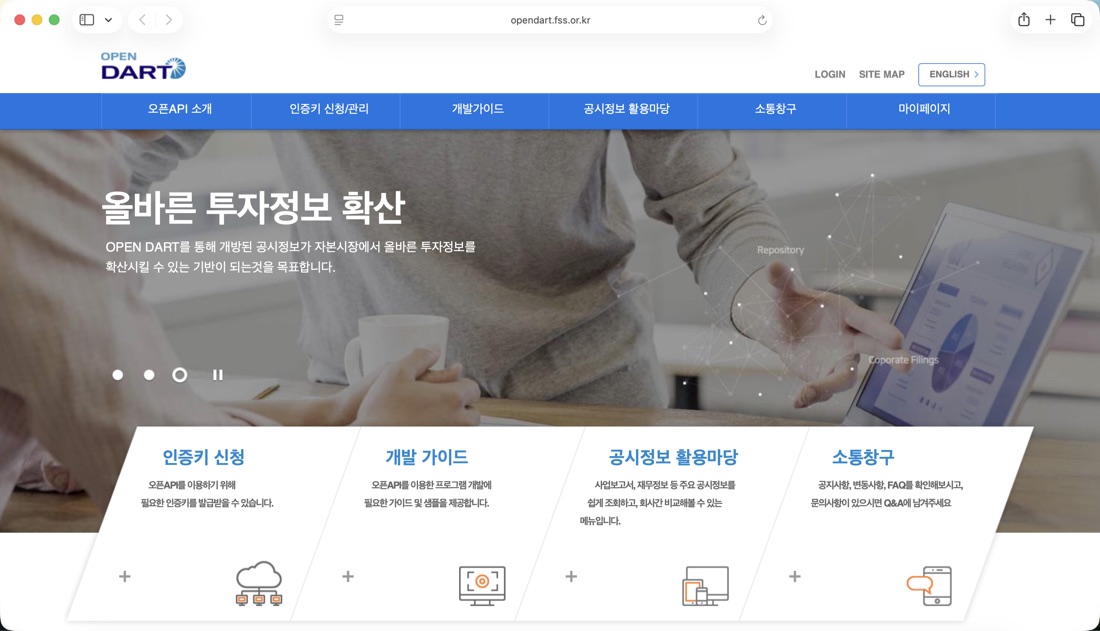 The OpenDART landing page. The “Apply for API Key,” “Developer Guide,” and “Disclosure Data Playground” menus are your starting points. (Source: screenshot of the OpenDART site, opendart.fss.or.kr)
Step 1: Getting an API Key — Follow the Real Screens
OpenDART requires an API key to use. This 40-character string acts as an ID card that says “you are an authorized user.” Getting one takes about five minutes.
- Sign up: Register with your email at opendart.fss.or.kr and verify it.
- Apply for the key: Go to the top menu [Apply for / Manage API Key] → [Apply for API Key]. As shown below, check the boxes for agreeing to the open API terms of service and consenting to the collection and use of personal information, enter your email, password, and intended API use (e.g., “personal investment analysis”), then submit.
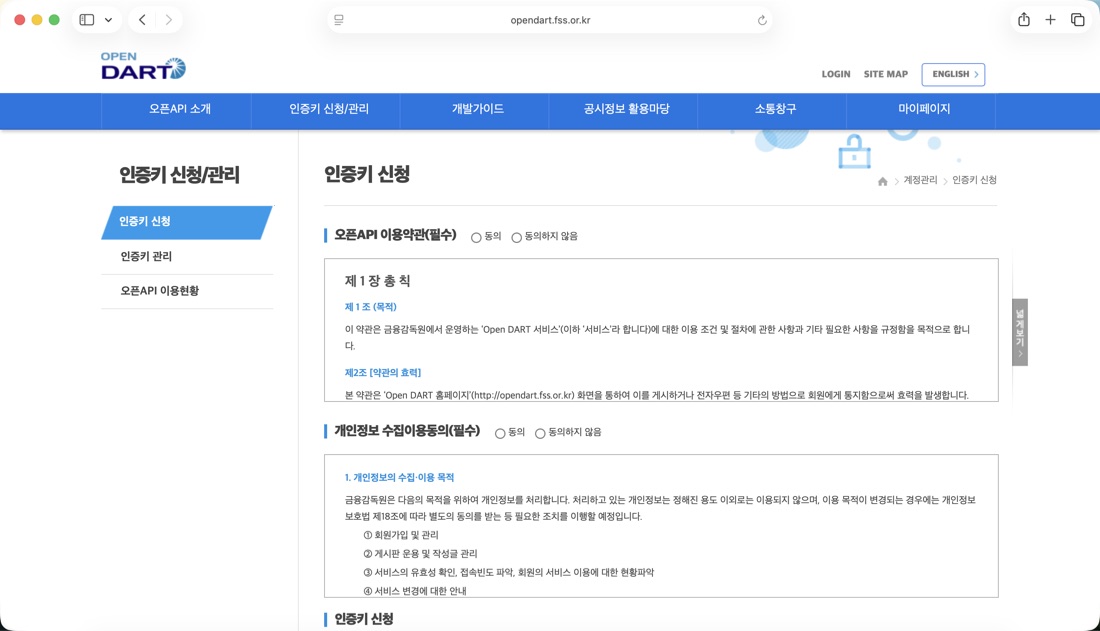 The API key application page — agree to the terms, note your intended use, and the key is issued instantly. (Source: screenshot of the OpenDART site, opendart.fss.or.kr)
- Retrieve the key: Under [My Page] → [Open API Usage Status], copy the 40-character key that was issued. Attach this key to every API request you make.
Never expose your key. When you push code to GitHub, don’t hard-code the key — put it in an environment variable (.env) and load it from there. If the key leaks, someone else can burn through your quota or misuse it.
Step 2: Understanding the API Structure — Six Categories
Once you have a key, head to the [Developer Guide] menu to see what you can fetch. OpenDART’s APIs break down into six broad groups.
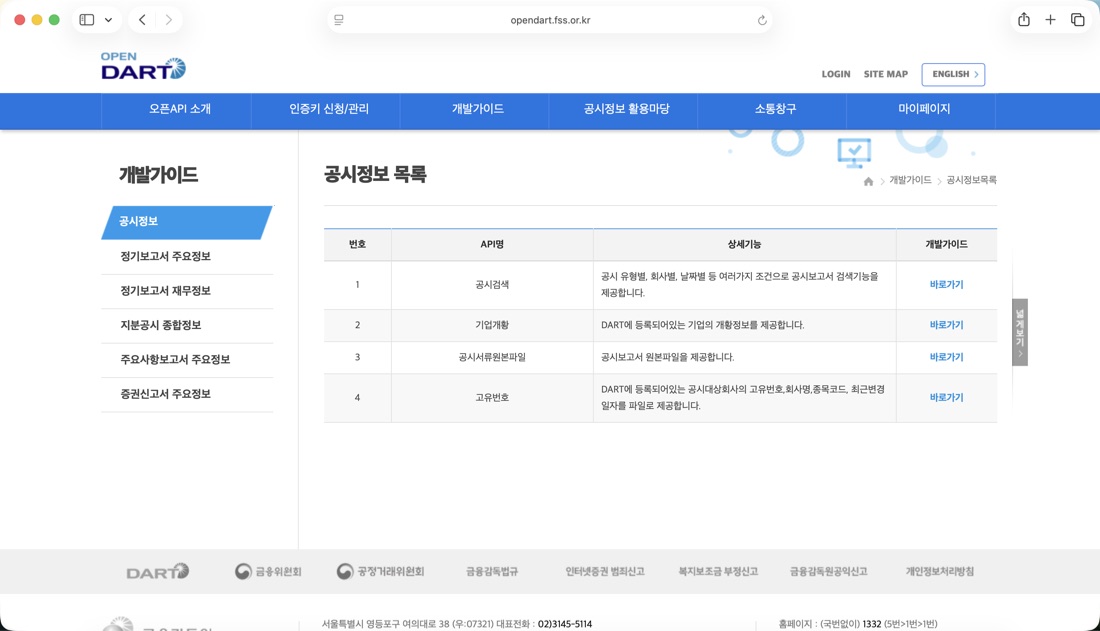 The “Disclosure Information” list in the Developer Guide — it provides per-API details and documentation for disclosure search, company overview, original disclosure documents, unique codes, and more. (Source: screenshot of the OpenDART site, opendart.fss.or.kr)
| Category | Representative APIs | What it gives you |
|---|---|---|
| Disclosure Information | Disclosure search, company overview, unique code | A given company’s disclosure list, company profile, corporate identifier |
| Periodic Report Key Info | Executive roster, dividends, largest shareholder, etc. | Core line items inside business reports |
| Periodic Report Financial Info | Single-company financial statements, multi-company comparison | Quarterly financial statements (revenue, profit, etc.) |
| Comprehensive Ownership Disclosure | Bulk holdings, executive holdings | Detailed ownership changes |
| Material Fact Reports | Rights offerings, mergers, etc. | Major corporate events |
| Securities Registration Statements | Equity securities, debt securities, etc. | Issuance-related disclosures |
The request mechanism is a simple REST API. Hit a fixed address (https://opendart.fss.or.kr/api/...) with your API key (crtfc_key) and conditions (company code, year, etc.) as parameters, and the response comes back as JSON or XML.
Step 3: Making Actual Calls
Here are the three most common calls as examples. Every request includes crtfc_key=YOUR_KEY.
① Get the unique code (corp_code) — OpenDART identifies companies not by name but by an 8-digit unique code. First, download the file of unique codes for all companies once.
https://opendart.fss.or.kr/api/corpCode.xml?crtfc_key=YOUR_KEY② Disclosure search — Fetch a given company’s recent disclosure list.
https://opendart.fss.or.kr/api/list.json?crtfc_key=YOUR_KEY&corp_code=00126380&bgn_de=20260101③ Single-company financial statements — Fetch the financial line items from a business report.
https://opendart.fss.or.kr/api/fnlttSinglAcnt.json?crtfc_key=YOUR_KEY&corp_code=00126380&bsns_year=2025&reprt_code=11011In Python, you can make these calls this concisely using only the standard library.
import os, urllib.request, urllib.parse, json

KEY = os.environ["DART_API_KEY"]  # load from .env (never hard-code in the source)
def dart(endpoint, **params):
    params["crtfc_key"] = KEY
    url = f"https://opendart.fss.or.kr/api/{endpoint}?" + urllib.parse.urlencode(params)
    return json.load(urllib.request.urlopen(url))

# Samsung Electronics (00126380), 2025 business-report financials
data = dart("fnlttSinglAcnt.json", corp_code="00126380", bsns_year="2025", reprt_code="11011")
print(data["list"][0])
The reprt_code in the response is the report type (11011 = annual business report, 11012 = half-year, 11013 = Q1, 11014 = Q3). Once you’ve internalized these few patterns, the rest of the APIs share the same structure, so you’ll expand quickly.
Use Cases — What You Can Build
The reason OpenDART is such a high-traffic topic is that its range of applications is so wide. Here are things individuals actually build and use.
- Financial screener: Pull the financial statements of many companies at once and automatically filter by revenue growth rate, operating margin, and debt ratio. Spit out a spreadsheet of “undervalued quality-stock candidates.”
- Disclosure alert bot: Periodically call the disclosure search API for your watchlist, and the moment a new disclosure drops (a rights offering, a buyback, earnings), fire off an instant alert to Telegram or Slack.
- Automated investment research: Scrape executive, largest-shareholder, and dividend data to auto-generate company profiles. A “personal company report” that refreshes every quarter.
- AI analysis integration: Hand the financial figures you pulled from OpenDART to an LLM and auto-generate commentary on “what changed versus the prior year.” The financial brain of my stock analysis agent built with Claude Code uses OpenDART in exactly this way.
In other words, OpenDART is “the source of Korean corporate data,” and on top of it you layer whatever you want — a screener, an alert bot, AI analysis. Before you pay for a brokerage’s premium data feed, just building on free OpenDART first will meet most personal analysis needs.
Caveats — Limits and Pitfalls
It’s free, but there are rules. Before you put it into production, keep these in mind.
- Daily call limit of 20,000: You can make up to 20,000 calls per day (as of 2026). That’s plenty for personal use, but if you’re running a screener that sweeps every listed stock daily, you’ll need a design that conserves calls (caching the unique-code file, and so on).
- API key security: As stressed earlier, manage the key as an environment variable and never commit it to a public repository.
- Data refresh timing: Financial data is reflected only after a periodic report has been filed and disclosed. Understand that this is “disclosure-based” data, not real-time quotes, and use it accordingly.
- Limits on unlisted and foreign firms: It’s centered on listed companies and major unlisted legal entities. Not every company is in there.
So What — From Someone Who “Reads” Data to Someone Who “Commands” It
OpenDART’s real value isn’t simply that the data is free. It’s that it shifts access to Korean corporate information from “manual work” to “automation.” The clicking-through-DART-page-by-page routine becomes a pipeline that, once written, runs itself every day and every quarter. Especially now, as feeding this data to AI to automate the interpretation too becomes the norm, the new edge for individual investors and analysts is less “can you read a financial statement” and more “can you command financial data over an API.”
Getting started takes exactly one thing today — applying for an API key. Get the key, drop the one-line list.json call above into your browser’s address bar, and the door to Korean corporate data swings open.
Note: This article explains how to make use of publicly available public data (OpenDART); it is not investment advice recommending the purchase or sale of any particular stock. API policies and limits are subject to change, so check the official site.
Sources
- OpenDART official site (service overview, API key application)
- OpenDART Developer Guide (detailed per-API specs)
- OpenDART API Key Application (issuance page)
Related reading: Building a Stock Auto-Trading Bot with Claude Code [Part 1] · Designing the Stock Bot’s LLM Analysts [Part 3]
댓글
✍️ 편집자 모드 — 이 댓글은 공개되지 않고 편집자에게만 전달됩니다.