Paperclip Hands-On — From Setup to Running an AI-Staffed Company [Part 2]
Part 1 covered “what Paperclip is and why, of all metaphors, a company.” This article answers exactly one question — so how do you actually set it up and run it? Not concepts, but something you can follow one command and one config file at a time.
Bottom line first: 90% of running Paperclip is three things. ① Define agents in AGENTS.md, ② assign work as issues, and ③ control tokens with heartbeats and budgets. Everything else is a variation on those three. Skip the third one from the start and you’ll faithfully re-enact the “313 million tokens gone in three days” incident I cover in Part 3.
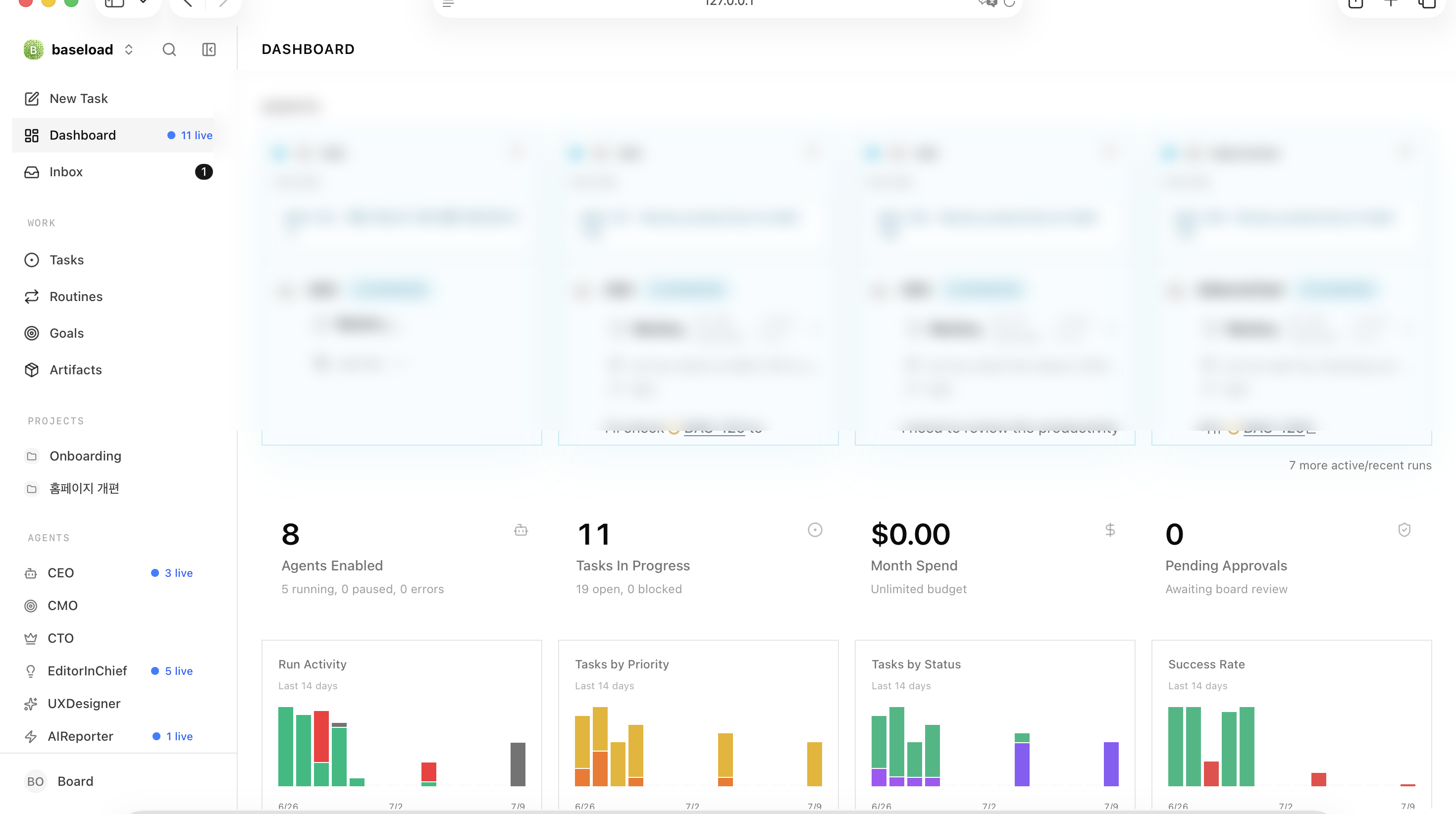 The actual Paperclip dashboard. On the left is the list of employees (agents); in the center are cards for the agents currently “at work”; below are the active-agent count, work in progress, this month’s cost, pending approvals, and an activity graph. (Internal work content is redacted.)

Five-minute install — stand up a “company” with one npx line
Paperclip runs locally. No cloud account, no credit card. If you have Node.js installed, it’s essentially one command.
npx paperclipai runThis command starts a local server (if the onboard from Part 1 is the one-time initial setup, run boots the server you’ve already created). Open http://localhost:3100 in your browser and you get a dashboard for the org chart, issues, and costs. All data is stored locally — because it uses the embedded PostgreSQL explained in Part 1, there’s no separate DB install and no cloud transfer. Instance files accumulate under your home directory at ~/.paperclip/instances/default, which is where companies, agents, and issues live.
On first run, a single company is created automatically. Here’s the one thing to watch. The moment you turn the server on, any agent with its heartbeat enabled wakes immediately and starts spending tokens. So the right move at first is to start with just one or two agents. You can grow the org later.
Hiring employees — define agents in AGENTS.md
As Part 1 introduced, a single employee (agent) is defined by four axes — role, model, working directory (cwd), and instructions. But in practice, the only thing you touch daily is essentially the instructions. The other three you set once and rarely change.
The instructions live in an editable AGENTS.md file attached to each agent. This file is that employee’s operating manual, and editing it directly takes effect at the next heartbeat (the next work cycle). In other words, when someone “can’t do the job,” you don’t swap the person — you fix the manual. A real reporter agent’s AGENTS.md looks roughly like this skeleton.
# Role: Economy Reporter (EconomyReporter)
- Only write topics the editor-in-chief assigns via an issue. Don't invent topics.
- 6,000+ characters, 4+ subheadings (h2), visualize numbers with tables/charts, 3+ sources.
- No buy/sell recommendations on specific stocks. Make "not investment advice" clear.

# Prohibitions (important)
- Do NOT send Telegram notifications directly (even if the task says to).
- Do NOT publish a draft:true post without human review.
- Report results only as an 'issue comment' when done.
The key is that you write the “don’ts” more meticulously than the “dos.” AI agents will do whatever you tell them, so a single explicit prohibition heads off accidents like the “duplicate notifications” I’ll discuss later.
The org we actually ran mimicked a newspaper. CEO → editor-in-chief → 2 reporters, plus marketing, engineering, and design roles. The editor-in-chief owns “content,” and the engineering lead (CTO) owns “code and deployment.” Clearly dividing ownership by role is the crux. When you need a new employee, you just create one more AGENTS.md and fill in the role and prohibitions.
Worth adding: the very idea of organizing software as a “company, employees, and roles” didn’t start with Paperclip. Back in 2023, experiments like ChatDev (a “virtual software company”) and MetaGPT (an “AI software company” mimicking CEO, PM, and engineer roles) already translated this metaphor into code. Paperclip carries that lineage all the way to the operational stage — where you actually run it and get billed.
Assigning work — one issue is a work order
The way a human gives goals isn’t conversation but filing an issue. The flow looks like this.
Enter a goal → create an issue → assign it to an agent → work → approval gate → publish the result.
On the command line, you throw work like this.
paperclipai issue create -C <companyId> \
  --title "Gas turbine market article draft" \
  --assignee-agent-id <employeeId> \
  --priority high \
  --description "6,000 words on the state of domestic gas turbine localization, with tables"
You check progress with paperclipai issue list -C <companyId>. Issues flow through states like work tickets at a human company.
open → assigned → in-progress → review → doneAgents that sleep by default and wake only when needed (wake-on-demand) can be roused with paperclipai agent heartbeat:invoke <employeeId> to pick up their assigned issues. Every result and report piles up as comments on the issue, which doubles as an audit log. For instance, a single article issue leaves a trail like this.
[Reporter]  Draft done. 6,200 words, 2 tables, 4 sources. Moving to review.
[Editor]    3rd paragraph has an unsourced figure — please reinforce. Rest passes.
[Reporter]  Source added.
[Editor]    Approved. Creating a deploy issue for the CTO.
Work that requires deployment, like code changes, gets handed to the CTO agent as an issue, delegating commit, deploy, and verification. Because who decided what and when is all preserved as comments, you can later retrace “why did this sentence go out like that?”
The one point to remember here: it’s not direct execution but a gate of “delegate as an issue → approve.” That gate is your only brake when you hand a company to AI.

Stopping token runaway — heartbeat & budget management (the most important part)
This is the most important passage in this article. Paperclip’s real cost comes not from “writing” but from the time an agent stays awake.
The heartbeat is the pulse that wakes an agent periodically. Set the interval to 300 seconds (intervalSec: 300) and it wakes 288 times a day. The problem is that on every wake it re-reads the company’s entire context (who did what and the current state). So even when you assign nothing, tokens balloon.
This is really a rerun of an old computer-architecture trade-off. “Polling,” which periodically checks state, keeps burning resources even when nothing is happening; the alternative that emerged is the “event/interrupt” model that wakes only when needed. The heartbeat maps exactly to polling, and wake-on-demand to interrupts — a half-century-old trade-off, except this time it comes back not as CPU cycles but as a token bill.
The number we hit was dramatic. Over three days, 313 million tokens were consumed, and of that, a single CEO burned 57% (177 million tokens). The reason was simple — only the CEO had its heartbeat on (288 wakes a day), and it was using the heaviest model on top of that.
The way to stop it comes down to four levers.
- Turn heartbeats off and switch to wake-on-demand for agents you don’t always need. Wake them only when needed and 288 wakes vanish.
- Give the heavy model only to the “one who needs to think long.” A light model is enough for the rest.
- Lower the concurrent-run cap (
maxConcurrentRuns). This stops multiple agents from spiraling all at once. - Pause idle agents. Don’t keep unused employees on standby — put them to sleep.
Build one inspection habit, too. Run paperclipai cost by-agent-model -C <companyId> --json once a day and you get “who spent how much,” broken down by agent × model. In our company, running this command painted roughly this picture.
Agent            Model        Tokens (3d)    Share
CEO              (top-tier)   177,000,000    57%   ← heartbeat ON
Editor-in-chief  (light)       62,000,000    20%
Reporters + 5    (light)       74,000,000    23%
────────────────────────────────────────────
Total                         313,000,000    100%
At a glance you can see one CEO burning more than half. Watch this table daily and you can catch “why is this employee so expensive?” that same day. Below is a rough table of how daily tokens change just by changing settings.
| Setting | Wakes/day | Model | Daily tokens (rough) |
|---|---|---|---|
| Heartbeat ON (300s) + top-tier model | 288 | top-tier | Very high (100M+) |
| Heartbeat ON (300s) + light model | 288 | light | Medium |
| Wake-on-demand + light model | Only when needed | light | Low |
Figures simplify the measured trend on our instance and vary by org size and workload.
Notifications, Telegram integration, and stopping “duplicate alerts”
How an agent notifies a human of results is simple. Place a notification script (e.g., notify-telegram.mjs) in the working directory and have the agent run it, and a message arrives on Telegram. All you need is two lines in a .env file.
# ~/projects/blog/.env
TELEGRAM_BOT_TOKEN=<token issued by BotFather>
TELEGRAM_CHAT_ID=<my chat ID>
You create the bot in Telegram’s @BotFather in a minute, and you get the chat ID by sending the bot any message and then querying it. With this set up, an agent reports to me with a single line, node scripts/notify-telegram.mjs "draft done". (Pulling it out into a script like this is far more stable than calling the messenger API directly from inside the agent runtime.)
Here’s the trap. When multiple agents each announce the same event, the same notification arrives two or three times. We also heard the complaint, “the same thing came three times.” The culprits were three — the editor-in-chief included “run a notification when done” while delegating to a reporter, the editor-in-chief also sent one itself, and permission errors triggered retries that amplified the alerts.
The fix boils down to two principles.
- Single-sender principle — funnel the channel that reaches a human through one agent (e.g., a CEO summary report).
- Idempotency principle — if you’ve already reported, don’t send again. Never put “run a notification” in a delegation comment.
A checklist for your first setup
- Start with 2 agents (over-organizing is the biggest waste).
- Start in approval mode — a human keeps the gate before anything auto-executes.
- Turn heartbeats on only for the agents that truly need them.
- Minimize heavy models.
- Build a habit of checking
cost by-agent-modelonce a day. - Spell out “prohibitions” in each
AGENTS.md. - Track results via issue comments (the audit log).
So What — the skill isn’t the tool, it’s org design
Turning Paperclip on takes five minutes. But running it well is not a tooling problem — it’s a problem of organizational theory. How many employees to keep, who to give the heavy brain, when to wake them — these decisions become your cost and your quality directly. Giving AI “a task” and giving it “an organization” are different levels of difficulty.
In the next Part 3, I run this very setup for ten real days and show — through the incidents that blew up (313M tokens gone, duplicate alerts, and the P&L that ultimately made me shut the org down) — how “design mistakes” come back as a bill. If setup is the theory, Part 3 is the record of that theory colliding with reality.
References
- Paperclip open-source project, GitHub
paperclipai/paperclip - Anthropic, “Building effective agents” (agent design principles) — anthropic.com
- This series: Part 1 — Paperclip primer, Part 3 — Ten days in production (measured data)
This article is not product promotion but a write-up of the author’s actual operating experience; the figures are measured trends from the author’s own instance.
댓글
✍️ 편집자 모드 — 이 댓글은 공개되지 않고 편집자에게만 전달됩니다.